
Every HACCP record in one place, without loose paper sheets
Fourteen digital logs: temperatures, blast chilling, core cooking, hot holding, thawing, frying oil, goods-in, sanitation, cleaning, pest control, maintenance, disposal, checklists and complaints. Plus non-conformities with their corrective action, staff training, documents, the food safety manual and the report for the inspection.
What you can manage with HACCP
Rooms and equipment
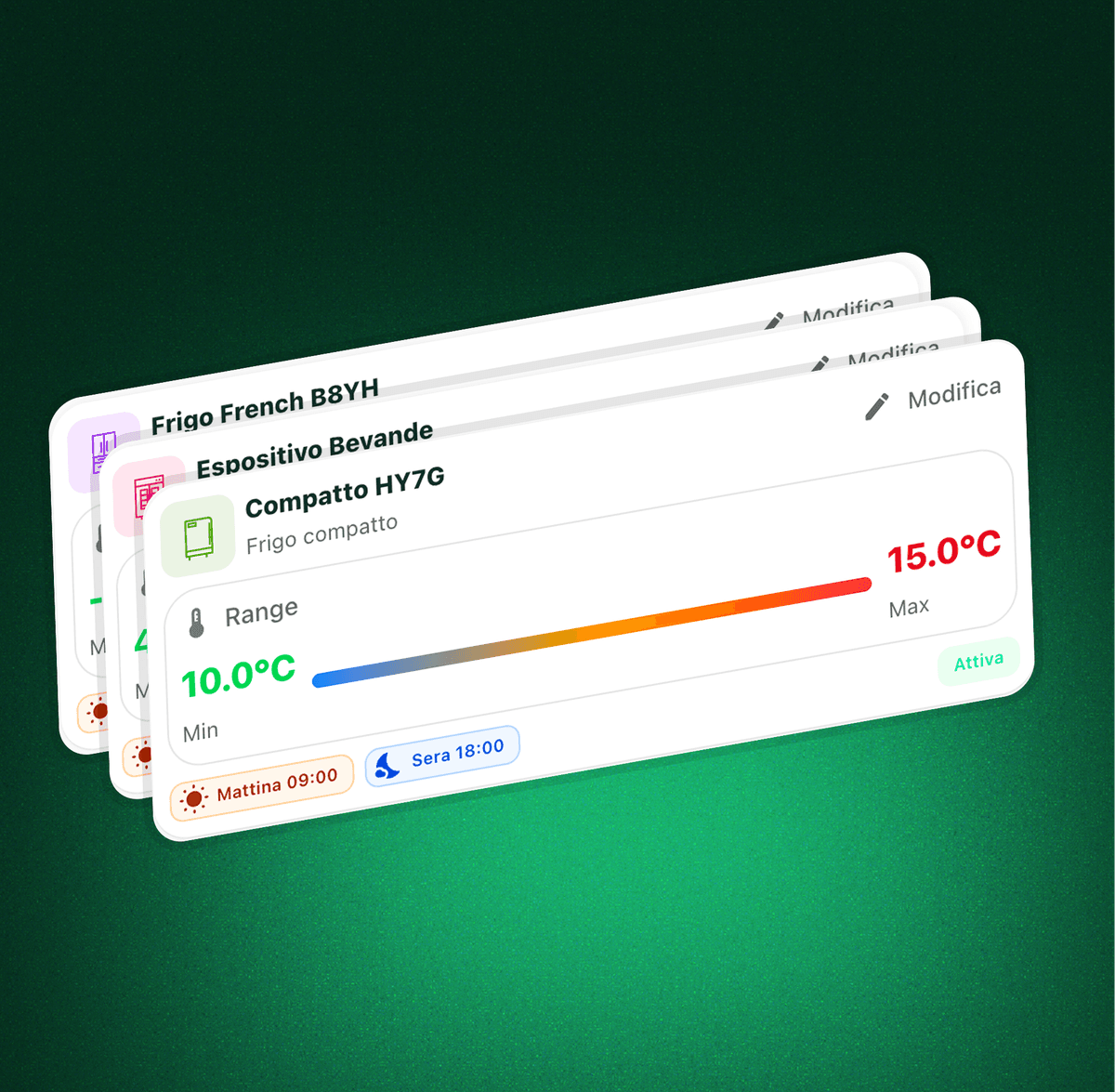
Group fridges, freezers, display units and machines by kitchen, store room, bar or any other area of the site, each with its own temperature range.
Temperature checks
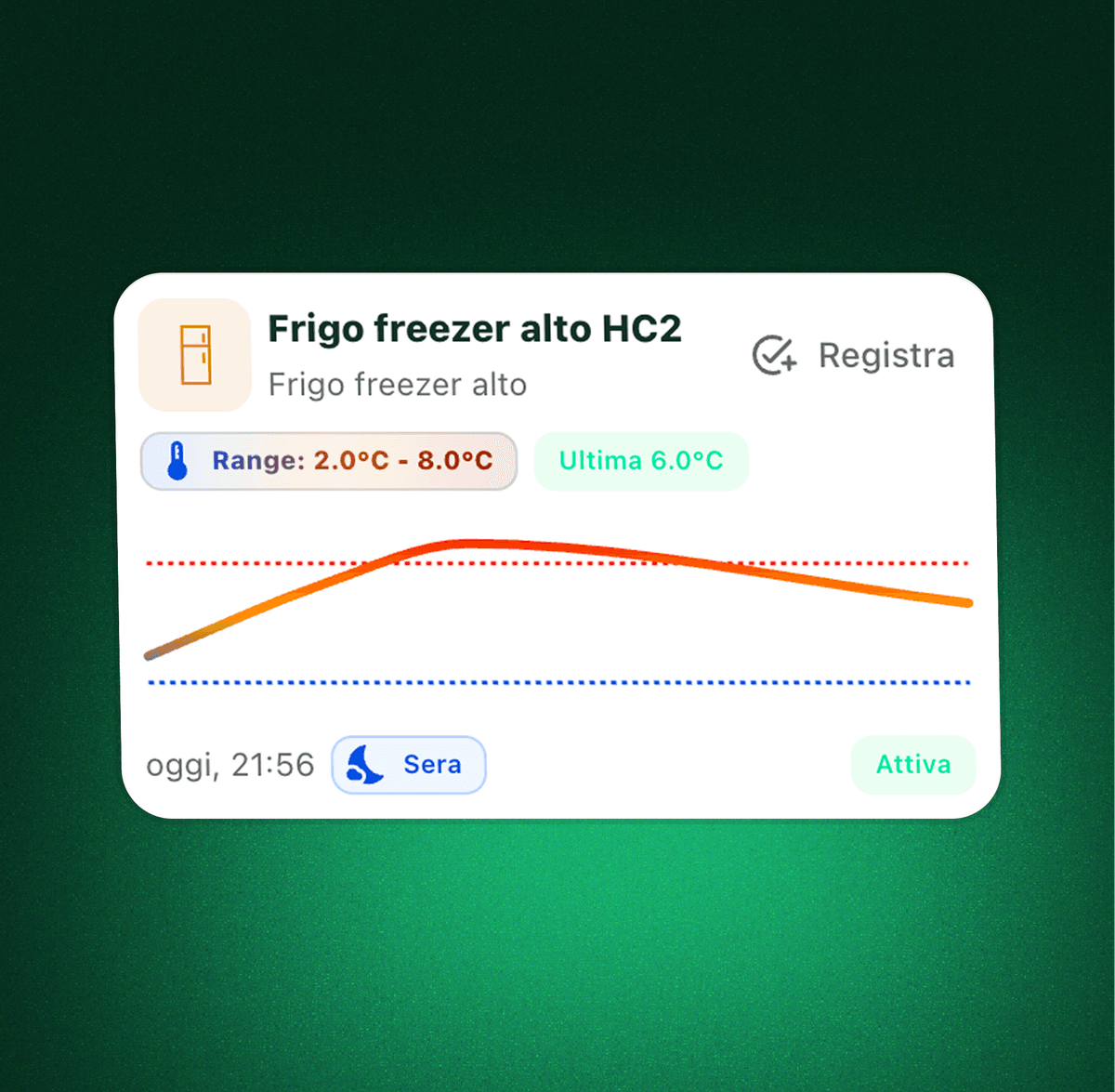
Record readings in a few taps across as many check slots as you need, and follow each unit over time with the temperature history and charts.
Equipment sanitation
Score how clean slicers, blast chillers and work surfaces are, against the threshold you set on that specific piece of equipment.
Twelve logs you can switch on
Blast chilling, core cooking, hot holding, thawing, frying oil, goods-in, cleaning, pest control, maintenance, disposal, checklists and complaints.
Products, batches and suppliers
Product fields suggest your own catalogue, batches come from stock, and goods-in reads the delivery notes and invoices already in Qubi.
Non-conformities and corrective actions
A reading outside the limit opens a non-conformity, and the only way to close it is to record what was actually done about it.
Staff and food hygiene training
Roles, PPE issued and food hygiene certificates with training body, region and expiry date, flagged before they run out.
Document archive
Registration, floor plan, water analysis, swab tests, pest control contract, food contact declarations and calibration certificates, each with its expiry watched.
Food safety manual
Generate the draft HACCP manual for a site from the data already in Qubi: premises, equipment, critical limits, staff and suppliers.
Switch on only the logs your site actually needs
Temperatures and sanitation are always on; the other twelve are enabled with a toggle in the settings and show up straight away on the HACCP page, in the control points and in the history. A pizzeria with no fryer never sees a frying oil log, a production kitchen with a blast chiller does not have to ask anyone to add one. Each log carries its legal reference next to it, so whoever enables it knows what they are enabling.
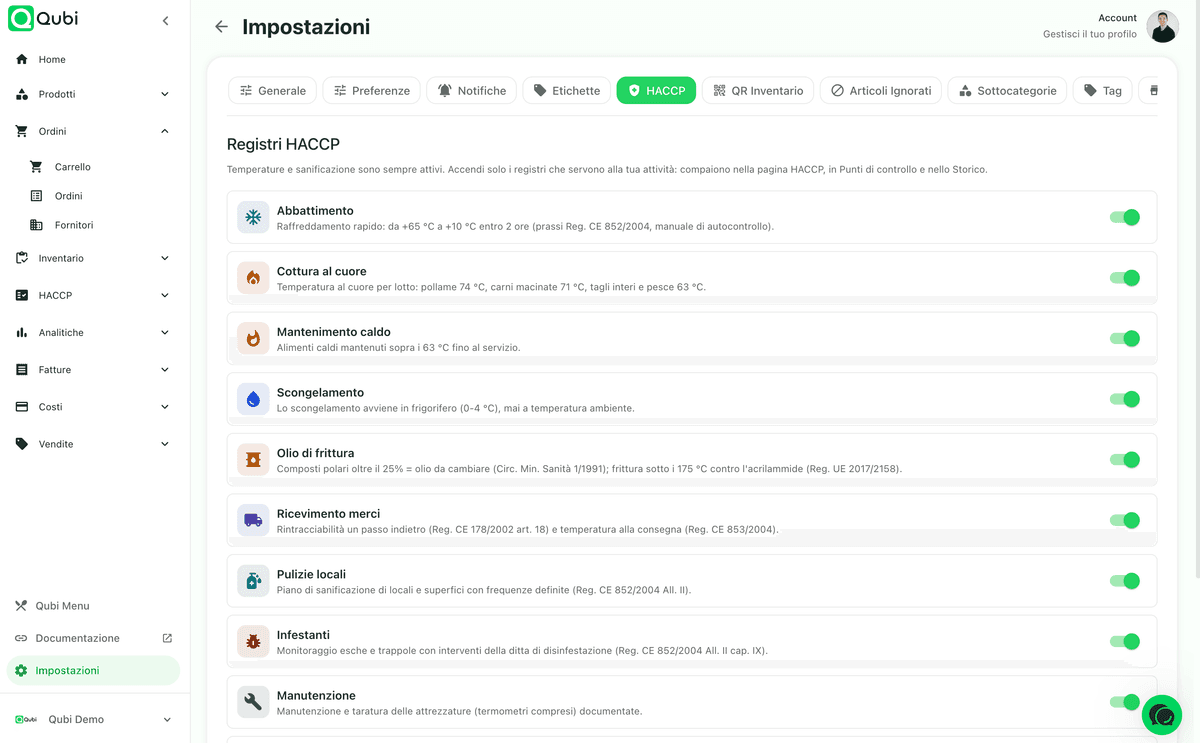
The fourteen HACCP logs in Qubi, one by one
An HACCP log is not a sheet with a date on it: it is an item to check, a critical limit, a frequency and an outcome. In Qubi every log runs on the same engine, so what changes is what you record, not how you record it. Here is what each one covers and the rule it answers to.
Every log has its own items and its own thresholds
The critical limit does not live in the log, it lives in the item. The blast chiller in the production kitchen and the one in the pastry section can have different times, two fryers can run different oils, two cold rooms do not share a range. In Qubi the threshold is set on the individual unit, the individual room, the individual bait station: the legal note stays on screen as a reference, but the outcome is calculated against the limit you declared.
That is also why a non-compliant check says which limit was missed. "Non-compliant" on its own cannot be corrected: the person logging it has no way of knowing whether they measured badly or whether the item's threshold was configured wrong in the first place.
The frequency follows the work, not the calendar
- Slots: temperatures, hot holding, frying oil and checklists are checked several times a day, at the moments you decide.
- Weekly: cleaning of rooms and surfaces, at the frequency declared in the cleaning plan.
- Monthly: pest control and maintenance, with the day of the month the check is due.
- On event: blast chilling, cooking, thawing, goods-in, disposal and complaints are recorded when they happen, not when a sheet says so.
- Active weekdays: a check can apply only on certain days, and the site's opening hours say when the place is closed.
Data you already have is not retyped
Product fields suggest the recipes and items already in your catalogue, and batches come from the lots open in stock: whoever logs the check picks, rather than types. Goods-in goes further: pick the supplier from the address book and the delivery note or invoice already in Qubi, and products and batches fill themselves in.
Some fields are completed later, and rightly so. Goods-in is recorded when the lorry unloads: at that moment the document has not been filed yet and the invoice has not been issued. Qubi lets the entry be saved and flags it as incomplete, instead of demanding a value that does not exist yet.
What gets recorded, log by log
| Log | What you record | Reference |
|---|---|---|
| Temperatures | Fridges, freezers, cold rooms and displays: the reading against the unit's range, across the slots of the day | Reg. EC 852/2004 Annex II |
| Sanitation | How clean each piece of equipment is, against the threshold set on that machine | Reg. EC 852/2004 Annex II ch. V |
| Blast chilling | Rapid cooling from +65 °C to +10 °C within two hours, with start and end temperatures and times | Reg. EC 852/2004, food safety plan |
| Core cooking | Core temperature per batch: poultry 74 °C, minced meat 71 °C, whole cuts and fish 63 °C | Reg. EC 852/2004 Annex II ch. IX |
| Hot holding | Hot food held above 63 °C until it is served | Reg. EC 853/2004 and food safety practice |
| Thawing | Thawing in a fridge between 0 and 4 °C, never at room temperature, with product, batch and start time | Reg. EC 852/2004 Annex II ch. IX, point 4 |
| Frying oil | Polar compounds above 25% means the oil is changed; frying kept below 175 °C against acrylamide | It. Min. Health Circ. 1/1991, Reg. EU 2017/2158 |
| Goods-in | One-step-back traceability and delivery temperature, with supplier, document, products and batches | Reg. EC 178/2002 art. 18, Reg. EC 853/2004 |
| Premises cleaning | The cleaning plan for rooms and surfaces at defined frequencies, with the product and method used | Reg. EC 852/2004 Annex II ch. I |
| Pest control | Monitoring of baits and traps with the pest control company's interventions | Reg. EC 852/2004 Annex II ch. IX |
| Maintenance | Maintenance and calibration of equipment, thermometers included, routine or extraordinary | Reg. EC 852/2004 Annex II ch. V |
| Disposal | Expired or non-compliant stock removed and recorded, used cooking oil handed to the licensed collector | Reg. EC 852/2004 Annex II ch. VI |
| Checklists | Opening and closing check lists, item by item, signed off by the person in charge | Reg. EC 852/2004 art. 5, food safety practice |
| Complaints | Customer complaints recorded with the action taken and the outcome | Reg. EC 178/2002 art. 19 |
Every room has its equipment, every unit has its own rules
An under-counter fridge, a store room freezer and a drinks display do not share the same temperature range or the same routine. In Qubi you separate them by room, set minimums and maximums, and the team sees exactly what needs checking.
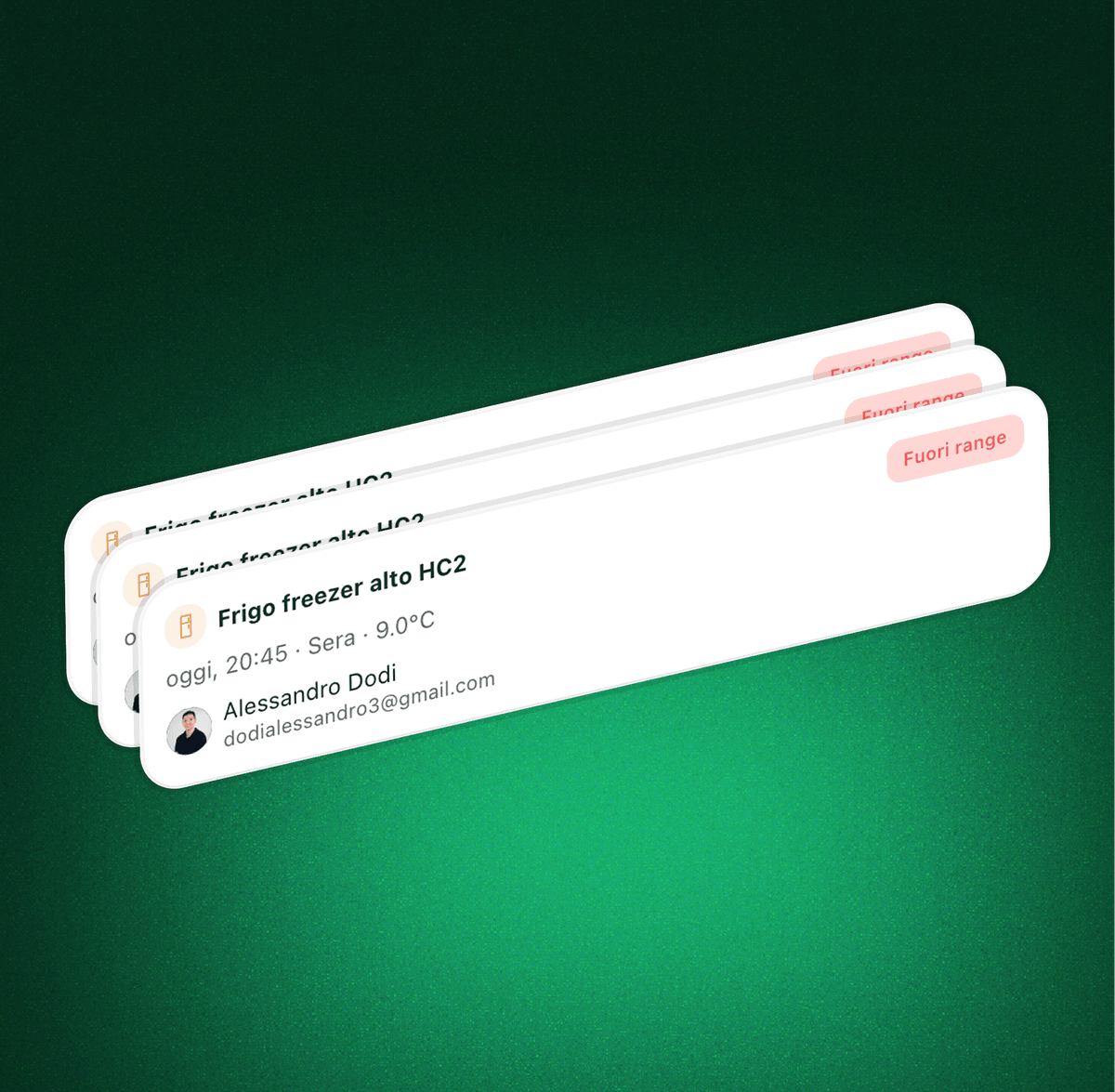
Who ran the check, when, and what they found
A log is only useful when it carries context, not just numbers. Qubi keeps the person, the time, the slot, the equipment, the reading and any operational notes, so the record is readable during an internal review or an inspection.
See the trend, not just the last reading
Temperatures only make sense over time. The history lets you review checks, anomalies and trends to work out whether a unit is stable, whether a fault keeps coming back, or whether a routine needs tightening up. Each log has its own tab, and you export the period you need from there.
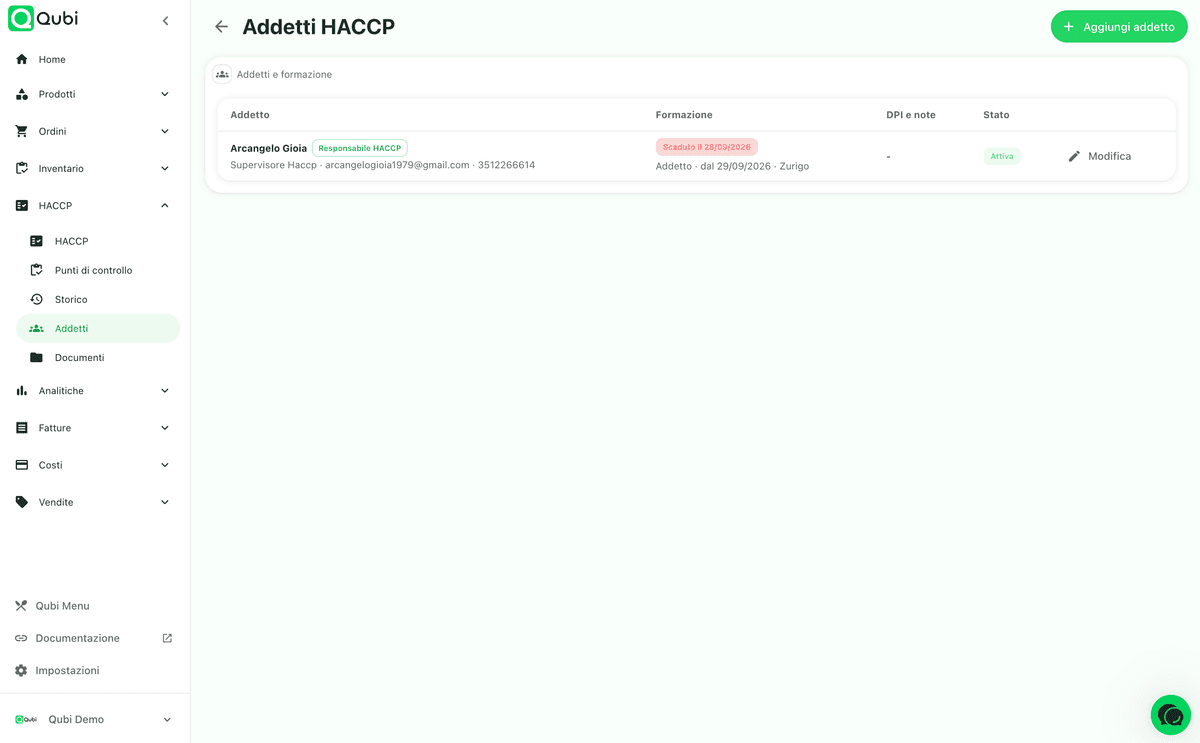
Who works here, in what role, with what training still valid
An inspection does not only ask for the logs: it asks who fills them in and whether they have been trained. On the staff page every person carries a role, contact details, the PPE issued and their food hygiene certificate with level, training body, region, date and expiry. Expired or soon-to-expire certificates stand out, and whoever is marked as the HACCP manager appears as such in the food safety manual.
The archive an inspector asks for, and the manual that opens it
Health registration, stamped floor plan, water analysis, laboratory swabs, pest control contract, food contact declarations, detergent data sheets, calibration certificates, supplier certifications: each document has its category, issue date and expiry, with a warning thirty days ahead. From here you also generate the draft food safety manual for the site, built from the data you have already entered.
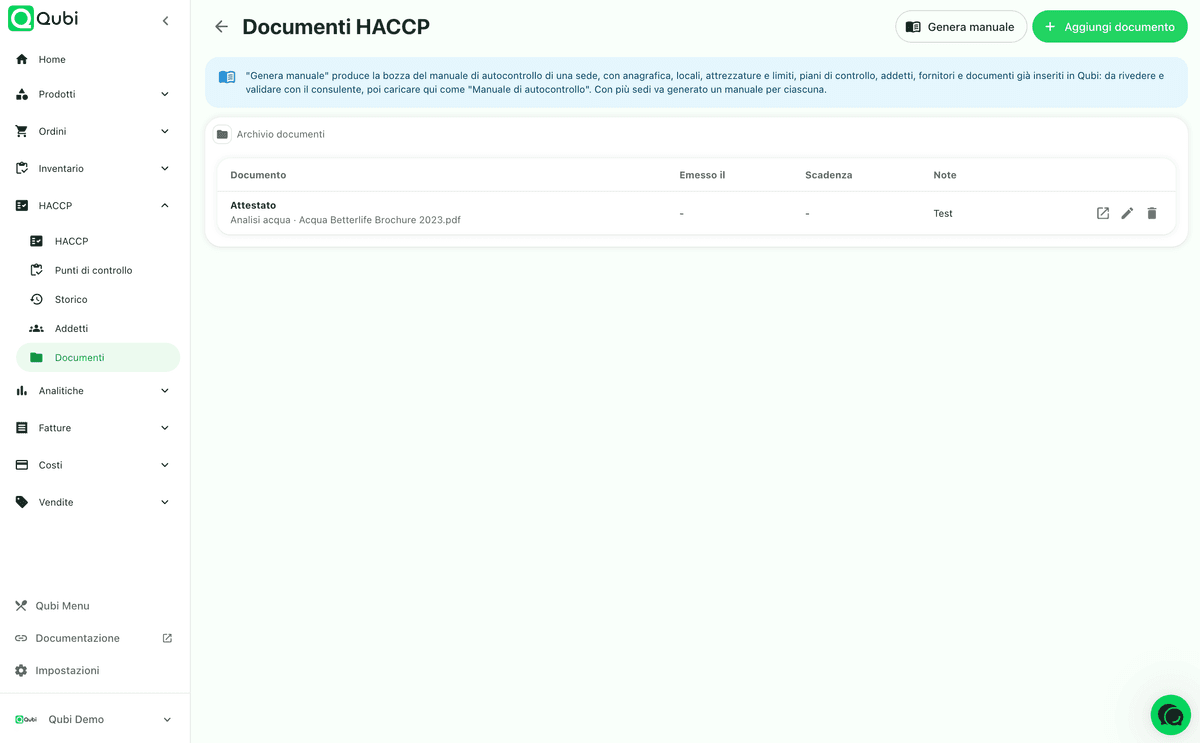
From an out-of-limit check to the report for the inspection
A log is not judged when everything is fine, but when something goes wrong. That is where a paper notebook stops: it records the problem and leaves it there. Qubi keeps the reading, the correction and the proof that the correction happened in the same place.
A non-conformity is closed by the action, not by filing it
When a check falls outside the limits, the entry is marked non-compliant and opens a non-conformity with the reason spelled out: which limit, which value, on which item. From the alert you go straight to the non-conformity list and record the corrective action: what was done, by whom, when.
Until that action exists, the non-conformity stays open and visible. That is the difference between a log that documents a problem and a log that documents the response as well, and the second is what an inspector expects to find.
Entries are completed, never rewritten
An HACCP log is only worth something if nobody can go back and tidy up a number. That is why entries in Qubi are append-only: a half-finished check can be completed by filling the empty fields, but the outcome and the date stay those of that day. Nobody rewrites yesterday.
Late checks do not quietly disappear either: they stay flagged as outstanding and trigger notifications, so a forgotten log is something you find, not something the inspector finds.
One PDF for the period you are asked about
The report gathers every log for a period into a single PDF, one section per log, plus the list of non-conformities with their corrective actions. The document carries a fingerprint of its own content, so an altered copy no longer matches the original.
The food safety manual is generated separately, one site at a time, because an inspection looks at one business at a time. It covers company details, responsibilities, premises, equipment with critical limits, control plans and procedures, allergens, suppliers and traceability, staff and training, attached documents. It is a draft: review it with your consultant, then upload it back into the archive as the official manual.
Built for the daily routine, not to complicate it
Faster routines
The team opens the HACCP page, sees what is still missing today and records the check without hunting for a form.
Realistic frequencies
Slots, weekly, monthly or on event: every log follows the rhythm of the check instead of one sheet that fits none of them.
Warnings that arrive early
Late checks, out-of-limit readings, certificates and documents about to expire are flagged before the inspection, not during it.
From the phone too
Temperatures can be logged over WhatsApp, without opening the dashboard in the middle of service.
An auditable log
Every check keeps the time, the user, the item, the values and the outcome, and nobody can rewrite an entry from last week.
Inspection ready
One PDF with every log for the period you are asked about, plus the draft food safety manual built from your own data.
HACCP software FAQ
Which HACCP logs Qubi covers, how thresholds work, what happens after a non-conformity and what you can print for an inspection.
Which HACCP logs can I keep in Qubi?
Fourteen. Equipment temperatures and sanitation are always on; the other twelve are switched on from the settings: blast chilling, core cooking, hot holding, thawing, frying oil, goods-in, premises cleaning, pest control, maintenance, disposal, opening and closing checklists and customer complaints.
Do I have to keep all of them?
No, which is exactly why they are switched on one by one. A pizzeria with no fryer has no frying oil log to fill in, a bar with no blast chiller has no blast chilling to record. Turn on only what your food safety plan calls for: the logs you leave off never appear on the HACCP page, in the control points or in the history.
How does the blast chilling log work?
You record the product, the starting temperature and time, then the final temperature and time. Qubi works out the duration and compares the result with the limits set on that blast chiller: the reference practice is +65 °C down to +10 °C within two hours (Reg. EC 852/2004 and your own food safety plan), but the threshold that decides the outcome is the one you configured.
Are core cooking temperatures checked automatically?
Yes. You pick the product category and Qubi applies the matching minimum: 74 °C for poultry, 71 °C for minced meat, 63 °C for whole cuts and fish. If the reading falls short, the entry is marked non-compliant and says which limit was missed, rather than just that something is wrong.
Can I track thawing and hot holding?
Yes. Thawing records the product, the batch, the start time and the confirmation that it happened in a fridge between 0 and 4 °C, never at room temperature. Hot holding checks that hot food stays above 63 °C until service, with the checks spread across the slots of the day.
How is the frying oil log recorded?
With the polar compounds measured, the assessment of colour, smell and foaming, and the confirmation that frying stayed below 175 °C. Above 25% polar compounds the oil has to be changed and the entry becomes non-compliant; the 175 °C limit is the acrylamide good practice from Reg. EU 2017/2158.
Does goods-in connect to supplier documents?
Yes. You pick the supplier from your address book and the delivery note or invoice already loaded in Qubi, and the products and batches fill themselves in. You record the vehicle and product temperature, whether packaging was intact, whether labels and dates were correct and whether the delivery was accepted. That is one-step-back traceability under Reg. EC 178/2002 art. 18, with the delivery temperature of Reg. EC 853/2004.
What about the checks that are not about food?
They are there too. Cleaning of premises and surfaces at defined frequencies (Reg. EC 852/2004 Annex II), monitoring of baits and traps with the pest control company's visits (Annex II ch. IX), maintenance and calibration of equipment including thermometers, disposal of expired or non-compliant stock and of used cooking oil, signed opening and closing checklists, and a customer complaints log with the action taken.
Can I set up different rooms and pieces of equipment?
Yes. You can organise fridges, freezers, display cabinets and other equipment by room or section, each with its own custom minimum and maximum temperature range. The same holds for the items in the other logs: every blast chiller, fryer, room or bait station carries its own thresholds and its own frequency.
Are checks limited to once a day?
No. Each log gets the cadence it needs: slots through the day for temperatures, hot holding, frying oil and checklists; weekly for premises cleaning; monthly for pest control and maintenance; on event for blast chilling, cooking, thawing, goods-in, disposal and complaints. You can also restrict a check to the weekdays you actually trade.
Does Qubi warn me when something is out of limit?
Yes. When a check is recorded outside the limits you configured, the anomaly is highlighted and a non-conformity is opened. Late checks are flagged too, so a forgotten log shows up well before an inspection rather than during one.
What happens after a non-conformity?
A non-conformity is not closed by noting it. From the alert you go straight to the non-conformity list and record the corrective action: what was done, by whom and when. Until that action is there, the non-conformity stays open and shows up in the report.
Can I manage staff and food hygiene training?
Yes. Every member of staff has a role, contact details, the PPE issued and their food hygiene training with level, training body, region, certificate date and expiry. Expired or soon-to-expire certificates are flagged, and whoever is marked as the HACCP manager appears as such in the food safety manual.
Where do I keep the documents an inspector asks for?
In the HACCP document archive, split by category: food safety manual, health registration, stamped floor plan, training certificates, water analysis, laboratory swabs, pest control contract, food contact material declarations, detergent data sheets, maintenance and calibration certificates, supplier certifications. For categories that expire, Qubi warns you thirty days ahead.
Does Qubi generate the food safety manual?
It generates the draft. One click produces a document with the company details, responsibilities, premises, equipment with critical limits, control plans and procedures, allergens, suppliers and traceability, staff and training, attached documents. It is built from the data already in Qubi, so it still has to be reviewed and signed off with your consultant and then uploaded back into the archive. With several sites you generate one per site, because an inspection looks at one site at a time.
Can I see who carried out each check?
Yes. The history keeps the date, the time, the slot, the item, the values recorded, the outcome and the person who logged it. From there you export the report for a period, with every log in a single PDF and a fingerprint that proves the document has not been altered.